What is Yazgan?
Yazgan is a content engine for your WordPress site. It watches the sources you choose (RSS feeds, news sites); when it sees a new story or post, it researches the topic, makes a plan and writes an original article in its own words. The article passes a quality gate and then, following the rule you set, stays as a draft, waits for your approval or is published.
The journey of a post
- Source — Yazgan picks up the new item in the feed. Items that do not match the campaign's rules (keywords, date range, items per run) are skipped.
- Research — The source page is read and, if you want, checked against more sources. robots.txt and a per-domain rate limit are always respected.
- Plan and write — The AI you choose (Anthropic, OpenAI or Gemini) makes a plan first, then writes; an editor pass corrects the text.
- SEO and GEO — Title, description, article schema, short answer, FAQ and source list are added.
- Quality gate — Rules such as similarity to the source, length and number of sources are checked; a post with problems stops with a warning.
- Save — The post is saved to WordPress as a draft and moves on according to the campaign's publishing mode (Draft · Approval · Automatic). If you chose one in the campaign, a featured image is added too.
Principles
- Source attribution is on by default: every post ends with "Source: publisher, date, link"; in the Mergen theme the “Source / agency” credits field is filled in too. It can be hidden per campaign (with a legal responsibility confirmation).
- Real author: every campaign is tied to a real WordPress user on your site; no invented authors, reviews or experiences are written.
- No copying: the source text is only an input of facts; the post is rewritten and passes a similarity check. (If you want to take feed content as it is, there is a separate mode, Verbatim import, which needs a responsibility confirmation.)
- Approval is the default mode: posts from a new campaign are not published until you approve them.
- Your keys stay with you: AI keys are stored encrypted on your site and are sent to the provider only from your site's server.
Requirements
| Minimum | |
|---|---|
| PHP | 8.1 |
| WordPress | 6.4 |
| Database | MySQL 5.7 or MariaDB 10.4 |
| Other | PHP sodium (WordPress's sodium_compat is used if missing); GD or Imagick is recommended for image cropping |
You need an API key from an AI provider (Anthropic, OpenAI or Google Gemini). The estimated cost per post is shown in the campaign wizard for the model you choose.
Panel screens
Yazgan has its own section in the WordPress menu: Overview · Generate article · Generate images · Bulk generate · Campaigns · Sources · Review queue · AI · Logs · Settings · License.
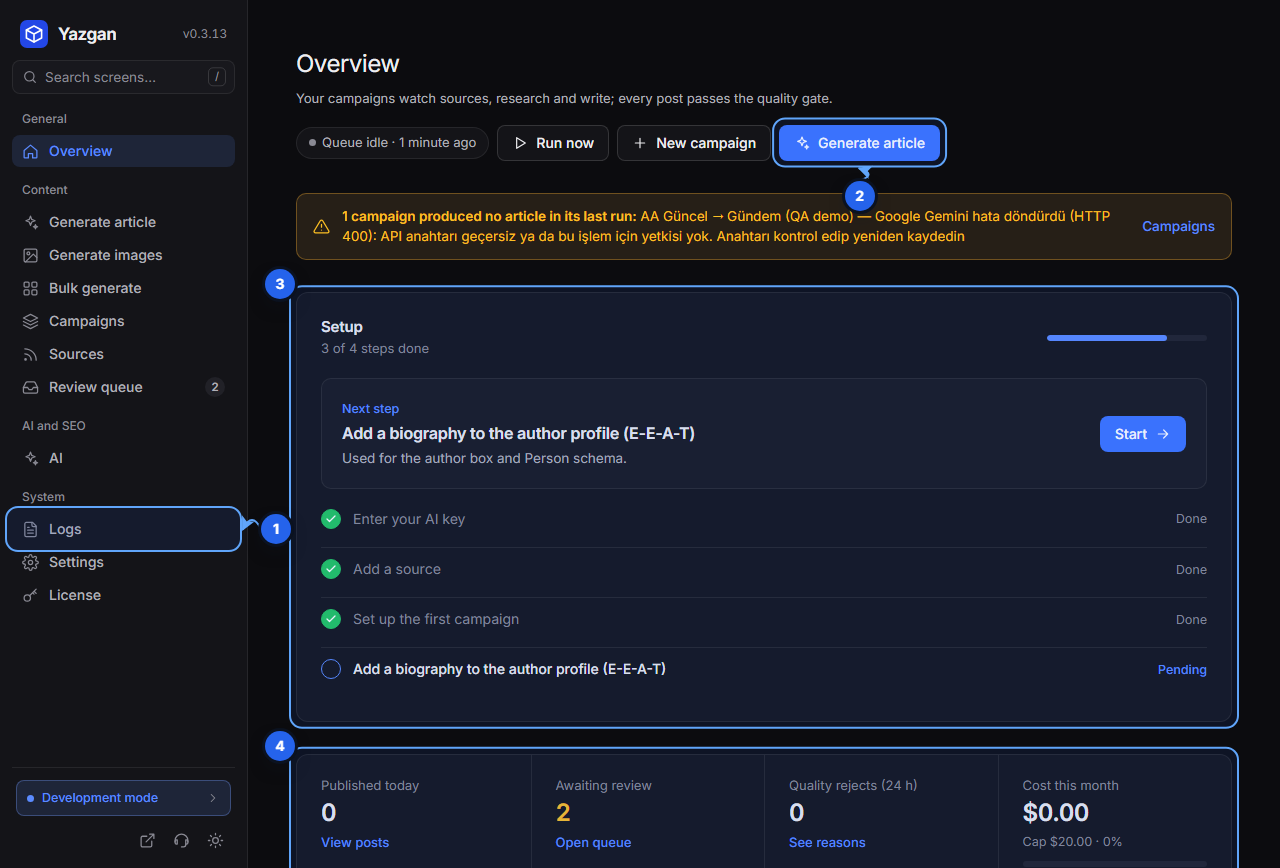
- Logs — in the System group.
- Generate article — a single post by hand.
- Setup — the next step and the completed ones.
- Published today, awaiting review, quality rejects and cost this month.