AI keys
Yazgan writes posts with the AI provider you choose, using your own key. You pay the provider directly; Yazgan is not a reseller.
Provider and key
On Yazgan › AI:
- Provider — Anthropic (Claude), OpenAI or Google Gemini. The provider you choose is used for writing; each provider's key is stored separately.
- API key — from the provider's panel (Get a key link). A saved key is never shown again; to change it, paste a new one. Leave the field empty to keep the saved key.
- Model — used for the research, writing and editor steps. Choose from the list or type the model ID from the provider's panel.
- Thinking level (on models that support it) — a higher level writes more carefully and uses more tokens.
- Image model — used on the Generate images screen (OpenAI or Google). Claude does not generate images. On Google, image generation needs billing on some keys.
Keys are stored encrypted on your site and are sent to the provider only from your site's server; they are never written to the logs.
Test and Try generation
First Save, then:
- Test — only reads the model list: verifies the key and uses no quota or credit.
- Try generation — sends a real, very short request to the model (1 request counts against your quota).
When quota runs out
Free Gemini keys have a separate daily limit for each model. If you turn on When quota runs out, the same key switches to another flash model when the selected model's daily quota is used up; when it is off (default), the post waits in the queue and continues when the quota resets.
Budget
The Budget section on the same screen shows this month's spend. If you set a monthly cap, generation stops when the cap is reached and continues from where it stopped when you raise it. Spend is an estimate based on the official list prices of Claude, OpenAI and Gemini; for a model without a known price, the provider's highest price is used and this section shows a warning. The exact amount is on your provider's invoice. The panel warns at 80% of the cap; when the cap is reached, queued work is not lost and continues when you raise the cap or when the new month starts. If you use a free Gemini key, turn on I use a free-tier key on the Gemini card: the estimated cap is not applied to Gemini and spend is still shown. Do not check it with a paid key. The campaign wizard's Writing step and Bulk generate show the estimated cost per post for the selected model.
Connection test
If AI requests fail, the Connection test shows DNS, connect, TLS and first-byte times, the IPv4/IPv6 address used, the LiteSpeed "noabort" state and the WP-Cron delay. More in Troubleshooting.
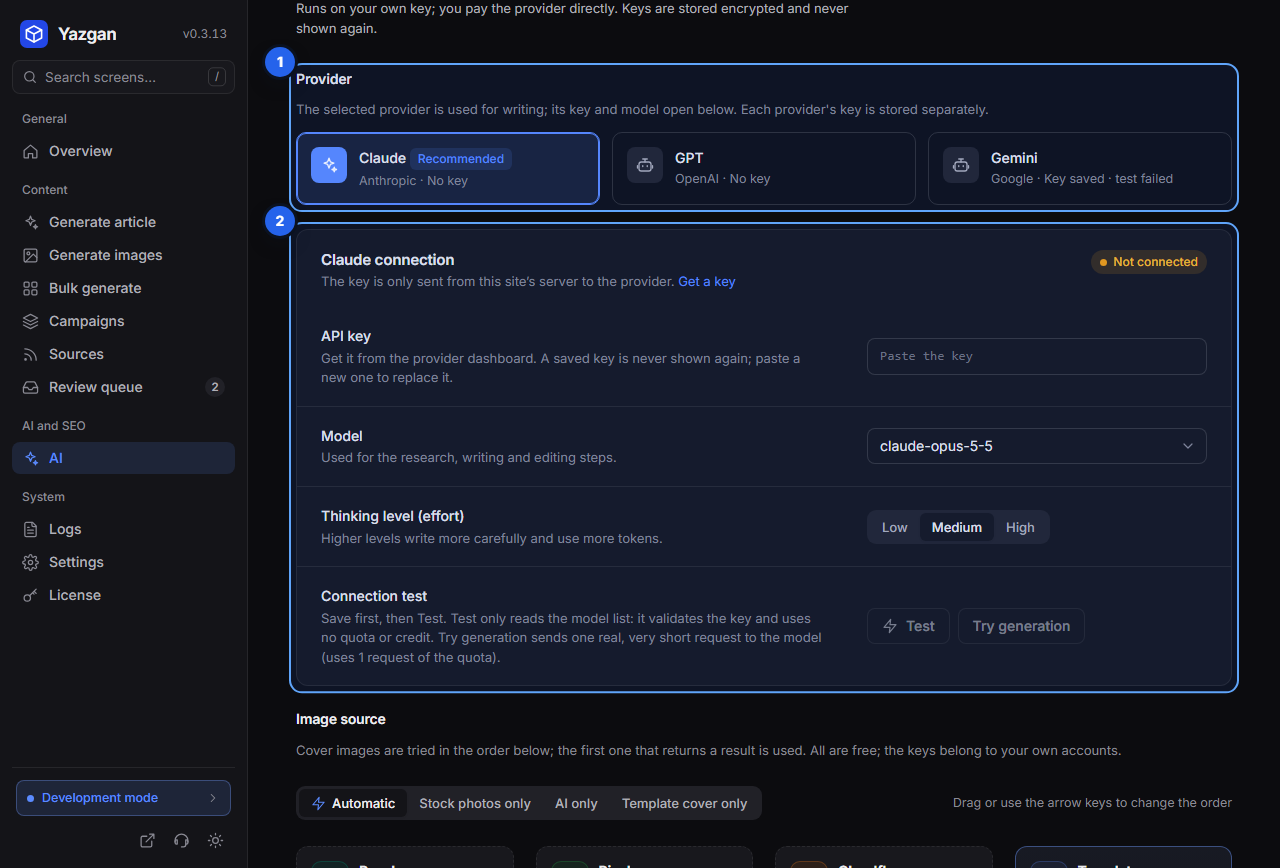
- Provider choice and each provider’s key status.
- API key, Model, Thinking level, Test and Try generation.