Campaigns
A campaign brings together a source, which items become posts, how they are written and how they are published. Yazgan › Campaigns › New campaign opens a five-step wizard; each step is saved with Continue, and you can go back with Back.
1. Source
- Campaign name — e.g. "Economy news".
- Source type (RSS · News site) — filters the source list to that type.
- Source — if it is not in the list, go to the Sources screen with New source.
2. Rules
- Must include — comma-separated words; at least one must appear in the title or summary. Empty: all.
- Must not include — an item containing any of these is skipped.
- Date range — Last N days (older items are skipped) or From – to (only items published between these days are taken; undated items are skipped).
- Max items per run — the most new items processed on each check.
The same story is not written twice: address and content pass the duplicate check (Settings › Protections).
3. Writing
- Writing mode — Rewrite with AI (recommended) or, with an RSS source only, Verbatim import (details).
- Post template — News + context · Guide / how-to · Explainer · On this day · Yearly review / dossier.
- Tone (Neutral · Friendly · Expert), Post language (Türkçe · English), Target length.
- Notes for the writer (optional) — added to the writing prompt and followed unless they contradict the sources or the quality rules. E.g. "Cite every figure; add context rather than opinion."
- AI — provider/model; below it, the estimated cost per post (research + writing + editor).
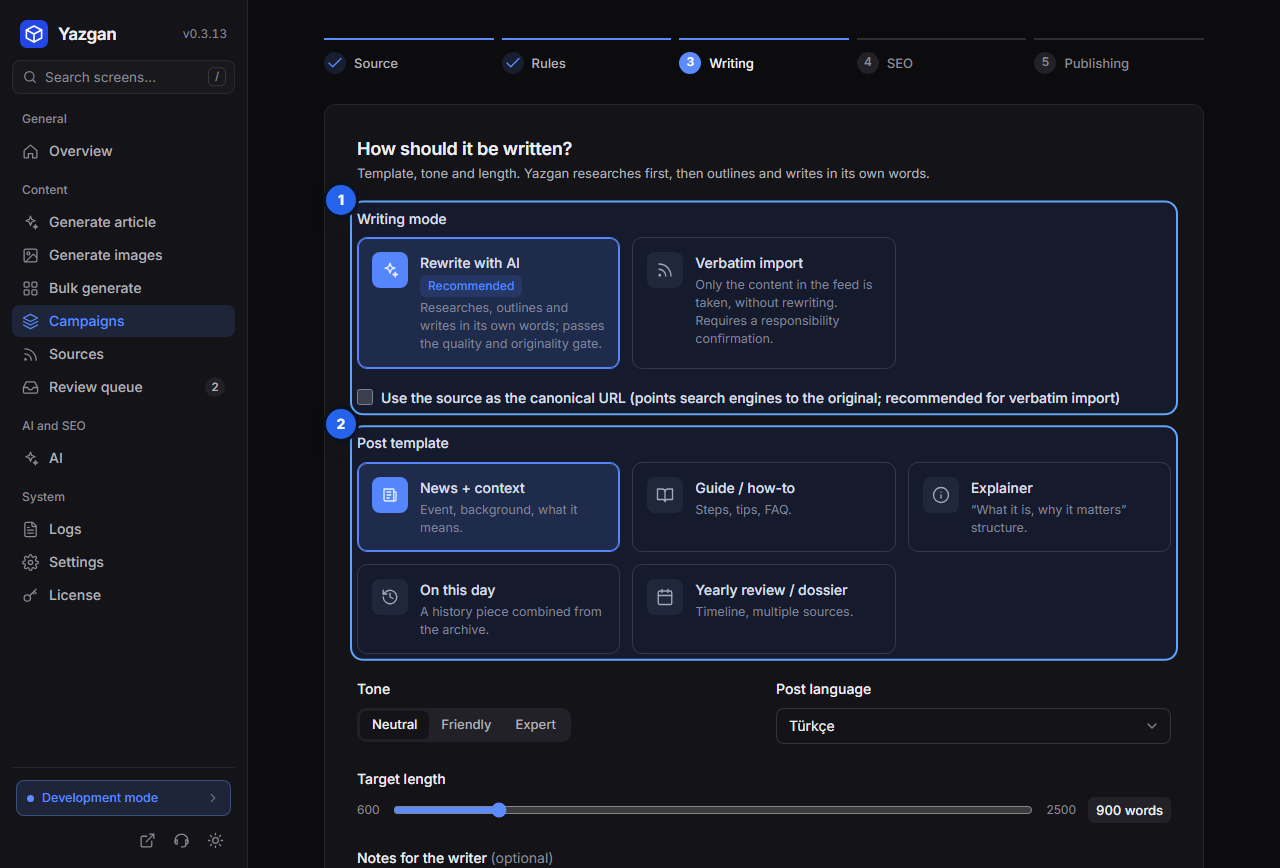
- Writing mode — Rewrite with AI or Verbatim import; canonical URL option.
- Post template.
4. SEO
- Article schema and Short answer paragraph — on for every post ("On for every post").
- FAQ — number of questions per post (0–8).
- Internal links — the most links the editor pass adds to the most closely related posts on your site (0–8; 0: none).
- Author — a real WordPress user; the author box and Person schema come from this user.
More in SEO and GEO.
5. Publishing
- Publishing mode:
- Draft — the post stays a draft in WordPress and skips the review queue; you publish it.
- Approval (recommended) — goes to the Review queue; published once you approve.
- Automatic — if the quality gate is clean (score above the threshold, sourced, not YMYL) the post is published on its own; otherwise it goes to the review queue with the reason. Needs a live license.
- When upgrading to 0.3.11: earlier versions did not apply the publishing mode (every post went to the review queue). So that no silent automatic publishing starts, campaigns saved as Draft or Automatic are moved to Approval and the panel shows a one-time notice; check the Mode column in the Campaigns list and choose the mode you want again in the wizard.
- Featured image — Let Yazgan create it · Source image · No image (details).
- Category and Daily limit (posts).
- Publishing window (optional) — in Automatic mode, posts are published only between these hours; a post ready outside them is scheduled for the start of the window (windows past midnight, such as 22:00–06:00, work too). Empty: any time.
- Source display (0.3.12):
- Show the source (recommended) — the Source name is filled in automatically (the source’s own name); you can change it and what you type is used exactly as written. Three switches: Show in the credits (the “Source / agency” field of the article credits in the Mergen theme), Show at the end of the article (“Source: publisher — title, date”) and Link to the source. The preview next to them shows the result. Credits and end of article can’t both be off.
- Don’t show the source — a dialog opens; it can’t be saved until “I accept legal responsibility for not showing the content’s source” is ticked. The consent is written to Logs with username, date and IP; the list shows a yellow Source hidden tag. For verbatim-import campaigns this option is locked.
- Changes apply to new articles only. To apply them to earlier articles too, use Apply to existing articles too…: the number of affected articles is shown first and confirmation is required; verbatim-import articles are left unchanged. Each article’s previous state is kept and Undo restores it in one click (both are written to Logs).
- Until the campaign is saved, the site default (Settings › Protections › Source attribution) applies; upgrading to 0.3.12 doesn’t change how existing campaigns behave.
On the last step, Save and start (or Generate a test post): the campaign is saved and activated, and the source is scanned once right away; new items (up to the per-run limit) are queued and reach the Review queue when ready. Without an AI key, only Save is shown.
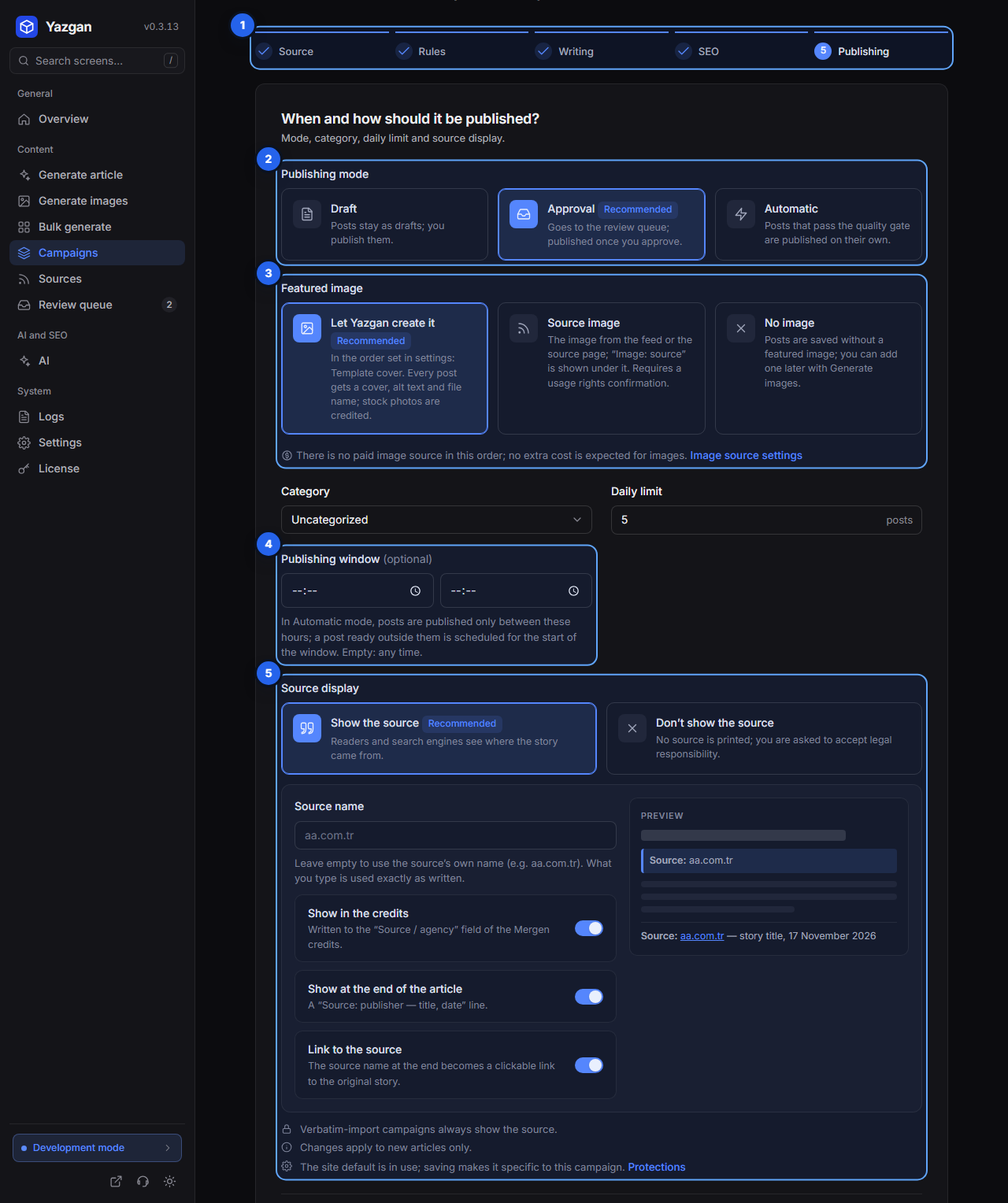
- The five wizard steps.
- Publishing mode.
- Featured image and the image cost.
- Publishing window (in Automatic mode).
- Source display — source name, credits / end of article / link switches and the preview.
Managing a campaign
In the Campaigns list you can turn each campaign on or off with its switch, run a round at once with Run now, or change it in the wizard with Edit. The list shows the posts produced today and published, the average quality and the time of the last run. If there is no scored post yet, quality shows — (the score is not 0). If the last run produced no post, the row states the reason in plain text (e.g. “Last run: The source is blocking your server (HTTP 403) — Logs”); if an active campaign has such a problem, the Overview shows a yellow warning too. The campaign checks its source at regular intervals; when it reaches the daily limit it continues the next day.