Logs and troubleshooting
Logs
Yazgan › Logs keeps a trace of every step: time, level, channel, event and detail. Narrow it with the search box and the channel filter; click a row to open its detail. Responsibility confirmations (verbatim import, source image, hiding the source), bulk apply to existing posts and undo, and protection changes are also written here. API keys and personal data are never logged.
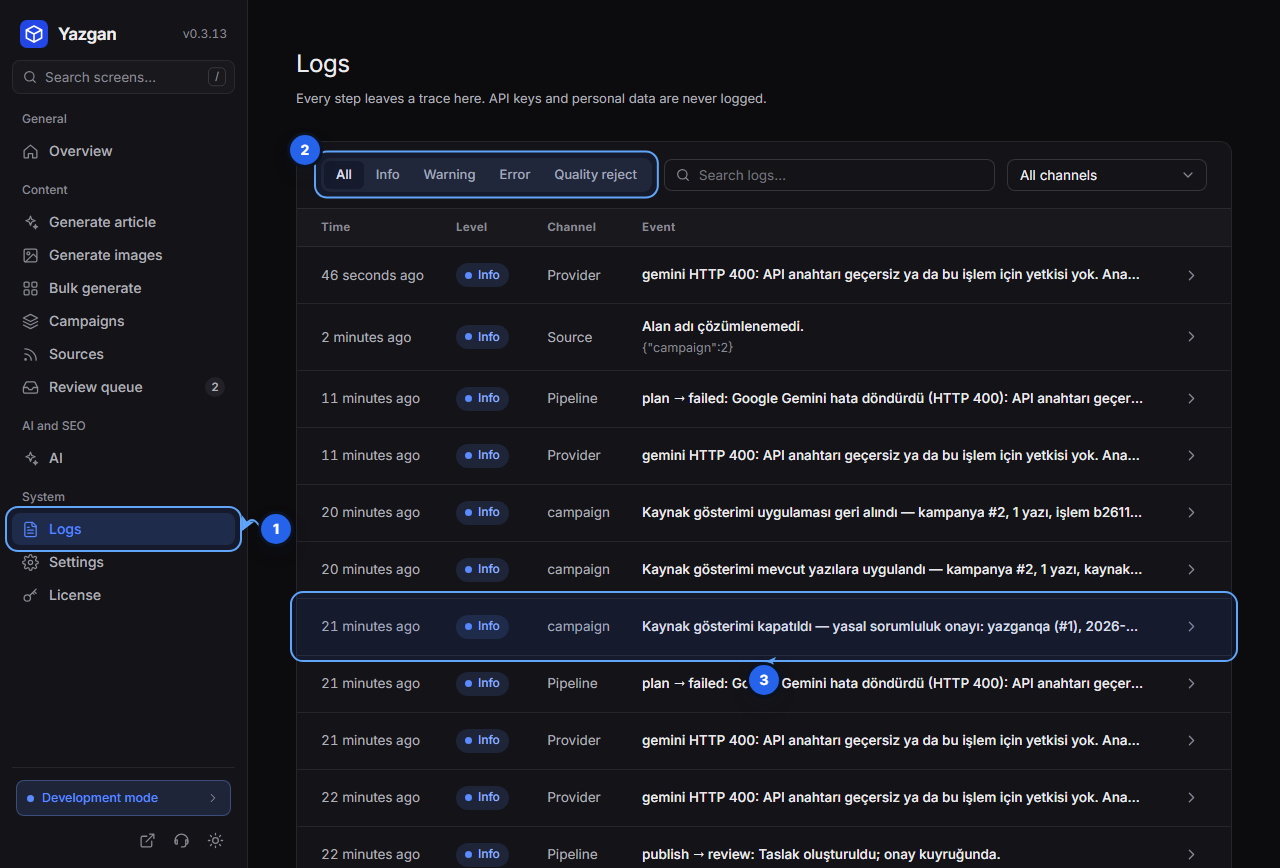
- Logs — in the System group of the menu.
- Level filter: All · Info · Warning · Error · Quality reject; search and channel filter next to it.
- A log row — click it to open the detail.
Common issues
| Symptom | Cause and fix |
|---|---|
| The post says "retrying", quota / 429 | The provider's daily or per-minute limit was reached. The message shows the provider's own explanation; the step is retried automatically. On free Gemini you can switch to another model with When quota runs out. |
| Timeout, could not connect, DNS error | Your server cannot reach the provider. Check AI › Connection test; if IPv6 cannot connect, Yazgan retries over IPv4 and remembers it. |
| Monthly budget cap reached | Raise the cap under AI › Budget; the job continues from where it stopped. |
| A step stays "Running" for a long time | If the process closed in the middle of a step (PHP time limit, error), the post is requeued without waiting for the lock to expire. If it persists, see the LiteSpeed note below. |
| Source shows "Warning" | The address is not an RSS feed; use the suggested feed (Sources). |
| Image not cropped / template cover not drawn | GD or Imagick is missing on the server; ask your host to enable it. |
| Quality shows — in the Campaigns list, with “Last run: …” below | The campaign has no scored post yet; the reason in the row says why the last run produced no post. “The source is blocking your server (HTTP 403)” means the source site refuses requests from your server — try another source (e.g. the site’s RSS feed). “The AI quota is used up” continues when the quota resets. Details in Logs (Quality rejection filter). |
| No posts are produced, campaign is on | The daily limit may be reached (continues the next day), the source may have no new items matching the rules, or the license is not active — check Overview and Logs. |
Developer notes
LiteSpeed "noabort"
LiteSpeed servers with "noabort" off can cut long background requests. Because Yazgan runs steps in the foreground while the page is open, this is not a problem in most cases; a warning still appears in the panel and the rule can be added to the top of .htaccess in one click (the previous content is backed up; Undo removes only the Yazgan block). On sites where file changes are disabled (DISALLOW_FILE_MODS), the line is for information only.
WP-Cron
On low-traffic sites WP-Cron can be late. Set Settings › Scheduler to Server cron and add a task on your server that calls wp-cron.php every minute, or run wp yazgan run with WP-CLI.
Error text for support
For image and generation errors, the error text you get with Copy contains the version, source, code, message, time and WordPress/PHP versions; it contains no key, prompt or personal data. Paste it into your support ticket as it is.
WP-CLI
| Command | What it does |
|---|---|
wp yazgan run [--campaign=<id>] [--steps=<n>] |
Scans active campaigns and processes pending items now (at most 10 steps by default) |
wp yazgan source-test <type> <url> |
Tests a source without saving it (e.g. wp yazgan source-test rss https://example.com/feed) |
wp yazgan status |
Shows the provider configuration (keys masked) and this month's spend |
wp yazgan backup list|create|rollback <name> |
Update backups (7 days): list, create, roll back |