Mergen documentation
Everything you need to set up, manage and keep your news, magazine, blog, store or business site up to date with Mergen is in this documentation. Every section is written so that someone who has never used WordPress before can follow it alone: first the goal, then the prerequisites, then numbered steps with screenshots, and finally common mistakes and links to related sections.
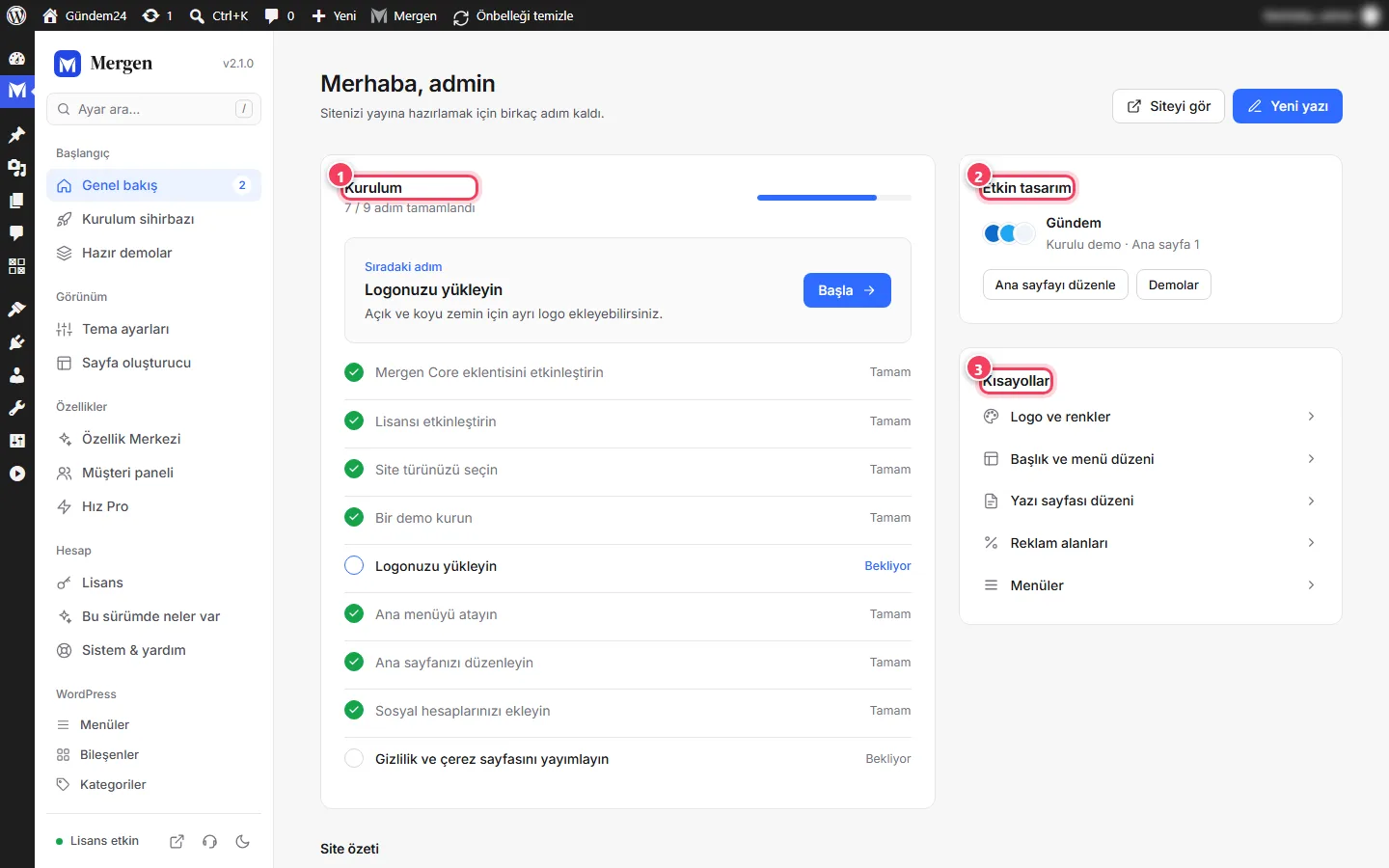
Where should I start?
If you are installing Mergen for the first time, read the sections in this order. Each step builds on the previous one; the whole process, including the demo import, usually takes 15–30 minutes.
- Installation and license — upload the theme, activate your license, install the Mergen Core plugin and complete the setup wizard.
- Demo import — preview the 61 ready-made demos live and import the one closest to your site in one click.
- Page builder and headline gallery — edit your homepage with drag and drop, using 242 blocks, 127 ready-made headlines and 90 ready-made post layouts.
- Theme settings — logo, colors, fonts, header, menus, footer and the Feature Center.
By site type
| Your site | Read first | Then look at |
|---|---|---|
| News, magazine, blog | Page builder, Theme settings | Customer panel, Speed Pro |
| Store (physical products) | Store and stocked licenses, Email and SMTP | Support system, Privacy and cookies |
| Digital products, licenses, e-pins, games | Store and stocked licenses, Customer panel | Support system, Mergen Core |
| Corporate, clinic, services | Corporate, booking and quotes, Email and SMTP | Customer panel, Privacy and cookies |
All sections
Getting started
- Installation and license — requirements, theme upload, license, Mergen Core, setup wizard.
- Demo import — live preview, import options, applying the design only, settings backups, removing demos.
- Page builder and headline gallery — the section, column and block logic; the Add block window; headline and post galleries; new post blocks.
- Theme settings — all settings tabs, the save bar, the Feature Center, menus and category colors.
Grow your site
- Customer panel — your members' account page; ready-made profiles by site type.
- Store and stocked licenses — WooCommerce, bank transfer and cash on delivery, license key and e-pin delivery, return requests.
- Corporate, booking and quotes — services, team, 4-step online booking, quote calculator, job applications.
- Support system — your customers opening tickets, you replying, canned responses and email templates.
- Email and SMTP — reliable sending, branded template, test email and email log.
- Privacy and cookies — cookie consent, no external requests before consent, legal pages.
- Speed Pro — page cache, image optimization, PageSpeed test.
Maintenance
- Mergen Core and your data — keeping your appointment, support and license data even if the theme changes.
- Updates and child theme — getting updates, customizing with the child theme, translation.
- FAQ and troubleshooting — license domain, memory limit, permalinks, demo import timeouts, cache.
- Release notes — what's new and fixed in each version.
Glossary
Short explanations of terms that appear often in the documentation:
| Term | Meaning |
|---|---|
| Demo | A ready-made site design with its colors, fonts, homepage and sample content. Mergen has 61 demos. |
| Section, column, block | The building pieces of the page builder: a section is a horizontal band, a column is part of a section, and a block is the actual content. |
| Headline | The large news area at the top of the homepage; it has 127 ready-made layouts. |
| Feature | A module turned on and off in the Feature Center (weather, CAPTCHA, support system…). The code of a disabled feature doesn't run. |
| Mergen Core | The companion plugin that stores data such as appointments, support tickets and license keys. Data is kept even if the theme changes. |
| Key pool | The license keys or e-pin codes you upload for a digital product; they are assigned automatically when a sale is made. |
| SMTP | Sending emails through your own email account, with authentication. |
| Cookie consent | The window where visitors choose whether to allow analytics, marketing and external content cookies. |
| Cache | A ready-made copy of pages; it speeds up the site and may need clearing after changes. |
| Child theme | The theme where you make your own code and template changes without breaking the parent theme (mergen-child). |
| Permalinks | The format of page addresses; "Post name" is recommended for Mergen. |
About this documentation
This documentation is written for Mergen 2.3.10 (Mergen Core 1.2.8) and is updated with every version. Screenshots are taken from the real Mergen panel and demo sites, and currently show the Turkish interface; on your screen, colors, demo names and menu names (e.g. "Our specialists", "Our salons") may differ depending on the demo you imported, but button and setting names are the same. The ? or How to use links on every panel screen take you straight to the relevant section of this documentation. If you notice that a step doesn't match your screen, let us know with a support ticket and we will fix the documentation right away.
Conventions used in this documentation
- Bold text marks button, menu and field names in the panel; they appear exactly the same on screen.
- Arrowed text such as Mergen › Theme settings shows a menu path: first click Mergen in the left menu, then Theme settings.
- Boxes such as Ctrl+S are keyboard shortcuts (use Cmd instead of Ctrl on a Mac).
- The numbered red frames in screenshots match the step numbers in the text.
Tip: Press / anywhere in the panel to open the settings search box. Typing a word such as "logo", "menu" or "SMTP" is enough to get to the related setting.
Need help?
If you couldn't find what you were looking for, check the FAQ and troubleshooting section first. If the problem persists, open a ticket from your Temorya account under Panel › Support: https://temorya.com/panel/destek. Including your site's address, the page where the problem appears and a screenshot of the Mergen › System & help screen speeds up the reply a lot.