Measurement and metrics
2. Measure first
Measure your site's current speed before changing any setting, so you can see the effect of each change.
- In the PageSpeed test box, choose Mobile or Desktop (1). Google bases rankings on the mobile score, so measure Mobile first.
- Click Test now (2). The test is run with Google Lighthouse and takes 30–60 seconds.
- The result shows the Performance score (0–100) and five metrics: LCP (time to load the largest content), FCP (first content), CLS (layout shift), TBT (total blocking time) and Speed Index. The date and type of the last test are saved.
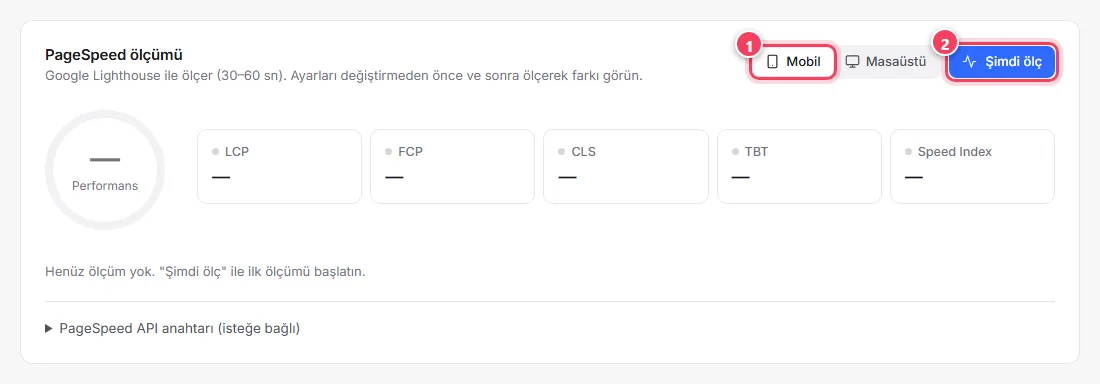
PageSpeed test: (1) Mobile/Desktop, (2) Test now. Turkish interface shown.
Tip: If you will test often, enter a free key from Google Cloud Console in the PageSpeed API key (optional) field. It works without a key too, but Google's daily quota is lower.
Which metric, which module?
This table shows which module to look at first, depending on the metric that scores low in the PageSpeed result:
| Low metric | What it means | Modules to check first |
|---|---|---|
| LCP (Largest Contentful Paint) | The page's largest element (usually the headline image) loads late | Page cache, LCP image priority, WebP / AVIF conversion, Image compression |
| FCP (First Contentful Paint) | The first content appears late | Page cache, Defer non-critical CSS, Host Google Fonts locally |
| CLS (Cumulative Layout Shift) | Content shifts while the page loads | Add missing dimensions (CLS), preloading fonts, a fixed height for ad areas |
| TBT (Total Blocking Time) | The browser is busy with JavaScript and the page is unresponsive | Delay JavaScript until interaction, Lightweight YouTube/Vimeo preview, turning off unneeded features |
| Speed Index | The page fills in slowly overall | Page cache, Gzip / Brotli, Render off-screen sections lazily |
Tip: Ad and analytics code is the biggest drag on the mobile score. Holding this code with Delay JavaScript until interaction until the visitor interacts with the page raises the score noticeably without reducing your revenue.